


Vibe Coding Tools
The vibe coding tool landscape has exploded. A year ago there were a handful of options. Now there are dozens, new ones launch every month, and half of them are vying for the same “best AI coding tool” real estate. It’s noisy.
This post cuts through it. We’ve broken the ecosystem into the categories that actually matter—AI assistants, code editors, prompt-based builders, deployment tools, and collaboration tools—and called out the specific tools worth your time in each one.
We’ve used most of these ourselves. The takes here are honest.

What Makes a Good Vibe Coding Tool
Not every AI tool that touches code qualifies as a vibe coding tool. The distinction matters. Vibe coding is about natural language driving development—you describe what you want, the AI builds it, you iterate. A tool that just autocompletes your Python is a code assistant. A tool that takes your idea and ships a working app is a vibe coding platform.
Here’s what separates the best tools from the rest:
• Output quality. Does the generated code actually work, or does it require constant manual repair?
• Iteration speed. Can you refine and redirect in plain language without starting over?
• Deployment pathway. Can you go from prompt to live URL without leaving the platform?
• Beginner accessibility. Can someone with zero coding background use it effectively?
• Context retention. Does the AI remember what you built earlier in the session, or does it hallucinate every few prompts?
The tools below are rated against these criteria, not just feature lists.
AI Assistants Used for Vibe Coding
AI assistants are the brains underneath most vibe coding tools. Some platforms expose the underlying model directly; others abstract it away. Either way, knowing which models power which tools helps you understand why one tool behaves differently from another.
Claude is the model of choice for a lot of serious vibe coders right now. It excels at understanding complex instructions, maintaining context across long conversations, and producing clean, readable code. If you’re using Cursor, you can plug Claude in directly. Several other platforms use Claude under the hood. Strong pick for anything involving nuanced product logic or detailed UI requirements.
Still widely used, still capable. GPT-4o is the default for a lot of tools and works well for general-purpose code generation. It’s slightly more likely than Claude to hallucinate on complex multi-step builds, but for straightforward tasks it’s fast and reliable.
Gemini is increasingly showing up in developer tools, particularly anything in the Google ecosystem. Still catching up to Claude and GPT-4o for nuanced coding tasks, but improving fast. Worth watching rather than betting on right now.
Most vibe coders end up with a preferred model the same way you end up with a preferred coffee order—through experience. If your current tool lets you switch models, experiment. The difference is real.
Code Editors That Support AI Workflows
These are tools built for people who are comfortable working inside a code editor—or who want to grow into it. They’re not purely point-and-click. They require some comfort with files, terminals, and occasionally reading the output the AI produced.
Cursor is the gold standard for AI-powered code editing right now. It’s built on top of VS Code, so if you’ve used VS Code before, the interface is familiar. What makes Cursor different is how deeply the AI is integrated—you can select a block of code, describe what you want it to do differently, and Cursor rewrites it in context.
The standout feature is its codebase-awareness. You can ask Cursor questions about your entire project (“Where is the authentication logic?” “Why is this function breaking?”) and get accurate, contextual answers. This is what makes it powerful for more complex builds.
Best for: builders who are ready to work with actual code files and want maximum control over the output.
Windsurf is Cursor’s closest competitor and worth serious consideration. It’s also a VS Code fork with deep AI integration, and its “Flow” feature—which handles multi-step agentic tasks autonomously—is genuinely impressive. Some builders prefer it to Cursor for longer automated tasks. Free tier is more generous than Cursor’s.
Best for: developers and intermediate builders who want an alternative to Cursor with stronger automation capabilities.
Copilot is the OG AI coding assistant—it’s been around the longest and has the widest IDE support. It’s primarily a code completion tool rather than a full vibe coding platform, which means it’s more of a co-pilot (hence the name) than a builder. Great as a supplement but not a standalone vibe coding solution.
Best for: engineers who want AI assistance layered on top of an existing workflow.
Prompt-Based Development Tools
These are the core vibe coding platforms—the tools where you put in a text description and get out a working app. No file navigation required, no terminal, no setup headaches. This is where non-technical builders should start.
Lovable is the best all-around starting point for non-technical vibe coders. You describe your app in plain language, it generates a full-stack React application, and you can see a live preview as it builds. The output is clean, the UI is polished without extra work, and it connects to Supabase for database functionality.
What sets Lovable apart is the iteration experience. When something is wrong, you tell it what to fix in the same natural language you used to build it. You’re never dropped into raw code unless you choose to be. Pricing starts with a generous free tier and scales reasonably.
Best for: non-technical founders, marketers, and solopreneurs building their first app or MVP.
Bolt is Lovable’s main competitor and runs entirely in the browser—no installation, no account linking required to get started. It’s fast, the component output is solid, and it handles a wide range of frameworks. Some builders find Bolt better for simpler projects where they want quick results without much setup.
The main limitation compared to Lovable is that the full-stack capabilities are less mature—database integrations and backend logic require more manual work. But for frontend-heavy builds, it’s excellent.
Best for: frontend-focused builds and builders who want zero setup time.
v0 is purpose-built for UI components. You describe an interface—a dashboard, a form, a pricing table—and v0 generates clean Tailwind and shadcn/ui components you can drop directly into a project. It’s not a full-app builder; it’s a component factory.
The quality of the UI output is genuinely excellent. Many vibe coders use v0 to generate specific interface sections, then bring those components into Cursor or a Lovable project for the full build.
Best for: builders who need polished UI components and are comfortable integrating them into a larger codebase.
Replit has been around longer than most tools in this list and has evolved significantly with AI integration. It’s a full cloud development environment with built-in hosting, which makes it appealing for projects that need a backend. Replit AI (powered by their own models plus external ones) assists with code generation throughout the IDE.
The trade-off: Replit has a steeper learning curve than Lovable or Bolt because you’re working in a real development environment. It’s better suited for builders who have some comfort with code concepts even if they’re not experienced developers.
Best for: builders who want a cloud IDE with integrated hosting and are comfortable with basic development concepts.
Deployment Tools for Vibe Coding Projects
Building the app is only half the job. Getting it live is the other half. Some vibe coding platforms handle deployment natively; others require you to connect an external service.
Vercel is the default deployment platform for most vibe coding projects. It integrates directly with GitHub, deploys automatically on every push, and handles frontend hosting with excellent performance. If you’re building with Lovable or Bolt, Vercel is the natural deployment destination. Free tier is solid for most early projects.
Netlify is Vercel’s main alternative and very comparable in features. Some builders prefer Netlify for its form handling and serverless function support. Either platform works well—pick one and stick with it. Switching later is not painful.
Supabase is the backend database layer that pairs best with vibe coding frontends. It’s an open-source Firebase alternative that gives you a Postgres database, authentication, and storage—all with a clean dashboard and solid documentation. Lovable integrates directly with Supabase, making it the default choice for any build that needs data persistence.
Collaboration Tools for AI Development
Vibe coding is often a solo activity, but when you’re building with a team—or building in public—a few tools make the process significantly smoother.
GitHub is non-negotiable if you’re building anything you want to keep, share, or deploy. Most vibe coding platforms (Lovable, Cursor, Bolt) connect to GitHub so your code is versioned automatically. You don’t need to understand Git deeply to benefit from this—just connect your account and let the platform handle commits.
Linear is the project management tool of choice for a lot of indie builders and small teams. It’s fast, opinionated, and integrates with GitHub so issues and PRs stay connected. If you’re tracking features and bugs across a vibe coding project, Linear is worth the setup.
Notion is where a lot of builders keep their product specs, prompt libraries, and build notes. It’s not a development tool per se, but for organizing the context you’ll bring into your coding sessions—feature outlines, user stories, design decisions—it’s hard to beat.
Comparing Popular Vibe Coding Tools
Here’s how the main tools stack up across the criteria that matter most for non-technical builders:
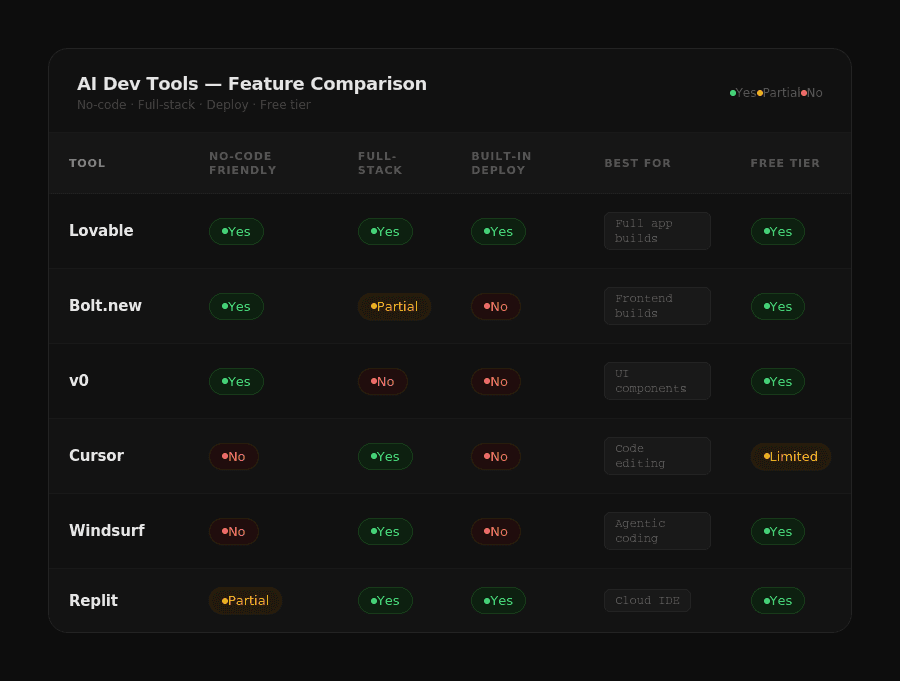
A few notes on that table: “No-Code Friendly” means a complete non-developer can use it productively without reading documentation. “Full-Stack” means it handles both frontend and backend out of the box. “Built-in Deploy” means you can go live without connecting a separate hosting platform.
Choosing the Best Tools for Your Workflow
The tool stack that works for you depends almost entirely on where you’re starting from. Here’s how to think about it:
If you’ve never built anything before: Start with Lovable. Create an account, describe your idea, and let it run. Don’t try to understand the code it produces. Just iterate on the output until it’s close to what you want, then deploy to Vercel. You can be live in an afternoon.
If you’ve done some no-code work and want more control: Try Bolt.new or Replit alongside Lovable. Learn how to read the files your tool generates—you don’t need to write code, but understanding the structure will make you dramatically better at prompting.
If you’re a marketer or growth operator: Lovable for app builds, v0 for landing page components, and CampaignPilots for the marketing layer on top of whatever you ship. That combination covers the full lifecycle from build to audience.
If you want to go deep on a real product: Graduate to Cursor. Learn how to use it with Claude as the underlying model. Get comfortable with the codebase chat feature. At this point you’re building like an indie developer, just with AI doing the heavy lifting.
One thing worth noting: most experienced vibe coders use multiple tools in combination. Lovable to prototype fast, v0 to polish specific UI components, Cursor to go deeper on specific features, Vercel to deploy, Supabase for the database. The ecosystem is designed to work together.
We’ve covered each of these tools in dedicated review posts—check the Tools section for in-depth breakdowns and head-to-head comparisons. And if you want to hear how actual builders are stacking these tools in their real workflows, the Builder’s Growth Lab podcast has covered this across multiple episodes.
Podcasts
[Ep. 22]



[Ep. 004]


This platform was started with a simple idea: to share stories that spark curiosity and inspire conversations. Our team of writers and creators is dedicated to bringing thoughtful and diverse voices together. We hope you find value in every read.
Frances Guerrero
Founder & Editor-in-Chief

FAQS
Welcome to Reado, your go-to source for insights, tips, and stories that inspire curiosity and learning. Our mission is to provide readers with high-quality content across topics like lifestyle, travel, productivity, health, finance, and technology.
We’re passionate about storytelling, creating a space where ideas come alive, curiosity thrives, and readers feel inspired to make informed choices.
How do I draw Frames?
To draw a Frame, click on Layout in the Toolbar, then select Frame. Now, you can click and drag anywhere on the Canvas.
How do I add images?
To add an image, select any Frame, and either double-click on it, or go to the Fill property. In the Fill property, switch to the image icon. Here, you can upload images.
How do I add videos?
To add a video to your site, click the “Insert” button and navigate to the “Media” section. Then, drag and drop a video component onto the Canvas.
Does Framer support XYZ?
To add a video to your site, click the “Insert” button and navigate to the “Media” section. Then, drag and drop a video component onto the Canvas.
Does Framer support XYZ?
To add a video to your site, click the “Insert” button and navigate to the “Media” section. Then, drag and drop a video component onto the Canvas.